

Choosing the Right 3D Scanning Tool for Engineering Projects
3D scanning is now widely used across construction, property, manufacturing, and heavy industry — but not all scanning tools are designed for the same outcomes. Choosing the right technology depends less on the buzzwords and more on what you actually need to do with the data after it’s captured.
This article explains the main types of 3D scanning commonly used in Australia today, what they’re best suited for, and how to choose the right approach for your project.
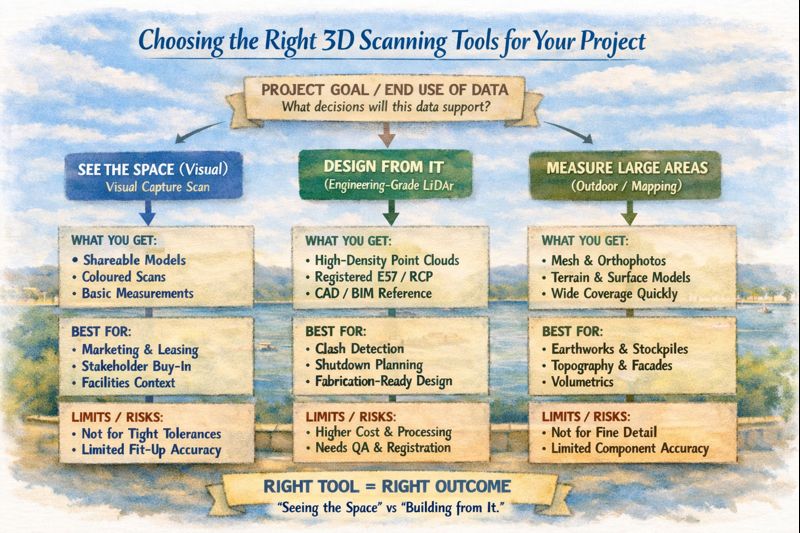
1. Visual Capture Scanning (Property, Architecture & Digital Twins)
Best for:
- Property marketing and virtual tours
- Design coordination
- Facilities management
- Heritage documentation
- Basic Scan-to-BIM
Typical outputs:
- Web-based walk‑through models
- Coloured point clouds
- Floor plans and simple BIM geometry
- OBJ / E57 exports for modelling
Strengths:
- Fast capture
- Lower cost
- Easy sharing via web platforms
- Excellent for stakeholder engagement
Limitations:
- Lower geometric accuracy
- Not suitable for fabrication tolerances
- Not reliable for mechanical or structural fit‑up
This type of scanning is ideal when the goal is visual context and spatial understanding, rather than precise dimensional control.
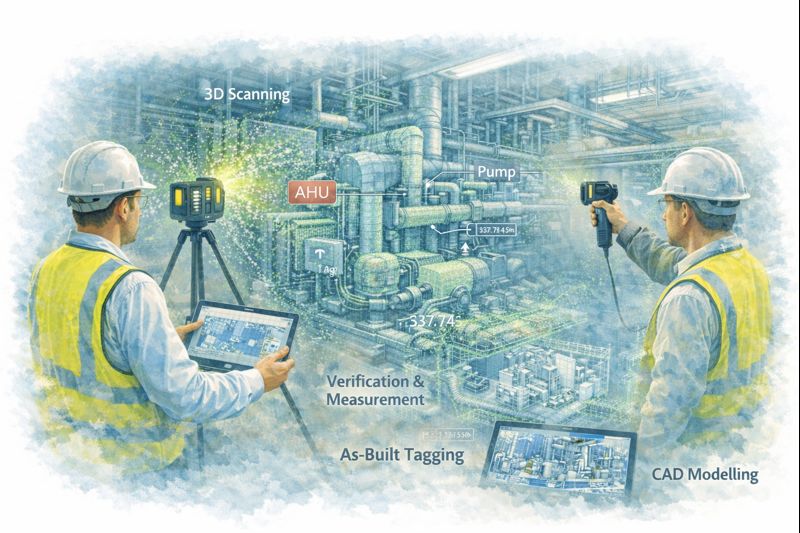
2. Engineering‑Grade LiDAR Scanning (Industrial & Retrofit Projects)
Best for:
- Mechanical and structural design
- Plant upgrades and brownfield sites
- Clash detection
- Fabrication‑ready modelling
- Shutdown planning
Typical outputs:
- High‑density point clouds
- Registered E57 / RCP datasets
- CAD‑ready reference geometry
- Scan‑to‑CAD and Scan‑to‑BIM models
Strengths:
- Millimetre‑level accuracy
- Long‑range capability
- Reliable for engineering measurement
- Suitable for design verification
Limitations:
- Higher equipment and processing cost
- Longer setup and registration time
- Requires engineering workflows to extract value
Engineering LiDAR is used when design decisions and fabrication depend on accurate geometry, not just visual representation.
3. Photogrammetry (Large Areas & Outdoor Mapping)
Best for:
- Stockpile measurement
- Terrain mapping
- Façade capture
- Infrastructure corridors
Typical outputs:
- Mesh models
- Orthophotos
- Surface models
Strengths:
- Covers large areas quickly
- Drone‑based access
- Useful for topography
Limitations:
- Less accurate for fine detail
- Poor performance in tight or indoor environments
- Limited for mechanical components
Photogrammetry is excellent for scale and surface data, but not for high‑precision engineering work.
4. Why the End Use of Data Matters More Than the Scanner
The most common mistake in 3D scanning projects is choosing a capture method before defining:
- Will the data be used for design and fabrication?
- Or mainly for visualisation and documentation?
- Do tolerances matter?
- Will components be manufactured from this data?
If scanning is only used for:
- Layout confirmation
- Space planning
- Stakeholder communication
Then visual scanning platforms may be entirely sufficient.
If scanning is used for:
- Equipment replacement
- Structural modification
- Pipework or conveyor interfaces
- Custom fabrication
Then engineering‑grade LiDAR is essential.
5. Matching the Tool to the Job
| Project Type | Recommended Technology |
|---|---|
| Real estate & virtual tours | Visual capture scanning |
| Office and building refurbishments | Visual capture or LiDAR depending on tolerances |
| Plant upgrades & shutdowns | Engineering‑grade LiDAR |
| Mechanical retrofits | Engineering‑grade LiDAR |
| Large outdoor mapping | Photogrammetry or LiDAR |
| Fabrication from existing assets | Engineering‑grade LiDAR only |
6. Scanning Is Only Step One
Regardless of the technology used, scanning only creates value when paired with:
- Proper registration and QA
- Engineering interpretation
- CAD modelling and documentation
- Design validation
Without these steps, point clouds remain large files with limited practical use.
The biggest performance gains come when scanning is directly integrated into:
- Engineering design
- Constructability reviews
- Clash detection
- Fabrication planning
Final Thoughts
3D scanning is not a single solution — it is a group of technologies with very different strengths.
The right approach depends on whether your project is focused on:
- Seeing the space, or
- Building from the space
Understanding that difference early can save significant time, cost, and rework later in the project lifecycle.
If you’re unsure which approach fits your project, start by defining what decisions and deliverables will rely on the data — then choose the scanning method that supports those outcomes, not just the fastest or cheapest option.