Why Shutdown Parts Don’t Fit — And How 2 mm LiDAR Scanning Stops the Rework

When Parts Don’t Fit, Shutdowns Fail

Every shutdown fitter, maintenance crew member, and supervisor has lived the same nightmare:

A critical part arrives during shutdown.
The old part is removed.
Everyone gathers, ready to install the new one.
Production is waiting.
The pressure is on.

And then—
the part doesn’t fit.

Not 2 mm out.
Not 10 mm out.
Sometimes 30–50 mm out, wrong angle, wrong bolt pattern, wrong centreline, or wrong geometry altogether.

The job stops.
People get frustrated.
Supervisors argue.
Fitters cop the blame.
The plant misses production.
And someone eventually says the words everyone hates:

“Put the old worn-out chute back on.”

This blog is about why shutdowns fall apart like this… and how 2 mm LiDAR scanning finally gives fitters a system that gets it right the first time.


The Real Reason Parts Don’t Fit

Most shutdown failures have nothing to do with the fitter, nothing to do with the workshop, and nothing to do with the installation crew.

Parts don’t fit because:

  • Wrong measurements
  • Bad drawings
  • Outdated as-builts
  • Guesswork
  • Fabricators “eyeballing” dimensions
  • Cheap non-OEM parts purchased without geometry verification
  • Designers who have never seen the site
  • High staff turnover with no engineering history
  • Wear profiles not checked
  • Intersection points impossible to measure manually

Fitters are then expected to make magic happen with a tape measure and a grinder.

It’s not fair. It’s not professional. And it’s completely avoidable.


Shutdown Pressures Make It Even Worse

When a part doesn’t fit during a shutdown:

  • The entire job stalls
  • Crews stand around waiting
  • The supervisor gets hammered
  • The fitter gets the blame
  • Other shutdown tasks cannot start
  • The clock ticks
  • Production loses thousands per hour
  • Everyone becomes stressed and angry

And the worst part?

You were only replacing the part because the existing one was worn out.
Now you’re bolting the worn-out one back on.

This isn’t good enough.
Not in 2025.
Not in heavy industry.
Not when there is technology that eliminates this problem completely.
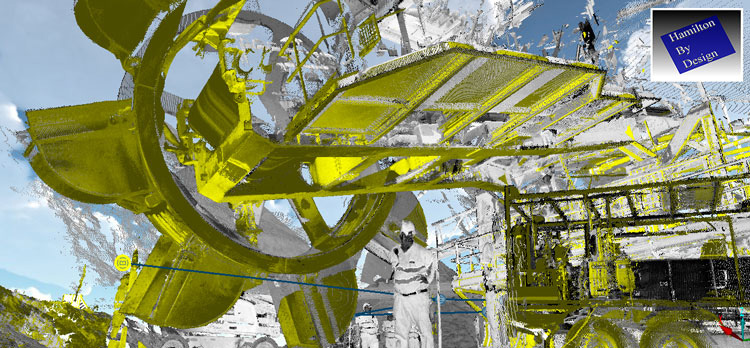

Coloured 3D LiDAR point-cloud scan of industrial CHPP machinery, including a large rotating component and surrounding structures. A worker stands beside the equipment for scale, with the Hamilton By Design logo displayed in the top-right corner.

Why Manual Measurement Fails Every Time

Fitters often get asked to measure:

  • Inside chutes
  • Wear sections
  • Pipe spools with intersection points
  • Tanks too large to measure from one position
  • Walkways too long for tape accuracy
  • Geometry with no records
  • Components 10+ metres above ground
  • Hard-to-reach bolt patterns
  • Angles and centrelines distorted by wear

But some measurements simply cannot be taken safely or accurately by hand.

You can’t hang off an EWP 20 metres up measuring a worn flange angle.
You can’t crawl deep inside a chute trying to measure intersecting surfaces.
You can’t take a 20-metre walkway measurement with a tape measure and hope for precision.

This is not a measurement problem.
This is a method problem.

Manual measurement has hit its limit.
Shutdowns have outgrown tape measures.


This Is Where 2 mm LiDAR Scanning Changes Everything

Hamilton By Design uses 2 mm precision LiDAR scanning to capture the exact geometry of a site — even in areas that are:

  • Too high
  • Too big
  • Too unsafe
  • Too worn
  • Too complex
  • Too tight
  • Too distorted to measure manually

From the ground, up to 30 metres away, we can capture:

  • Wear profiles
  • Flange positions
  • Bolt patterns
  • Pipe centrelines
  • Chute geometry
  • Conveyor interfaces
  • Complex intersections
  • Ductwork transitions
  • Mill inlet/outlet shapes
  • Tank dimensions
  • Walkway alignment
  • Structural deflection
  • Existing inaccuracies

No tape measure. No guesswork. No EWP. No risk.

The result is a perfect 3D point cloud accurate within 2 mm — a digital version of real life.


2 mm Scanning + Fitter-informed Design = Parts That Fit First Time

This is where Hamilton By Design is different.

We don’t just scan and hand the files to a drafter who’s never set foot on-site.

We scan and your parts are modelled by someone who:

  • Has been a fitter
  • Understands how parts are installed
  • Knows what goes wrong
  • Knows how to design parts that actually fit
  • Knows where shutdowns fail
  • Knows what to check
  • Knows what NOT to trust
  • And most importantly — knows where the real-world problems are hidden

This fitter-informed engineering approach is why our parts fit the first time.

And why shutdown crews trust us.


Digital QA Ensures Fabrication Is Correct Before It Leaves the Workshop

Once the new chute, spool, or component is modelled, we run digital QA:

  • Fit-up simulation
  • Clash detection
  • Tolerance analysis
  • Wear profile compensation
  • Reverse engineering comparison
  • Bolt alignment verification
  • Centreline matching
  • Flange rotation accuracy
  • Structural interface checks

If something is out by even 2–3 mm, we know.

We fix it digitally — before the workshop cuts steel.

This stops rework.
This stops shutdown delays.
This stops blame.
This stops stress.

This is the future of shutdown preparation.
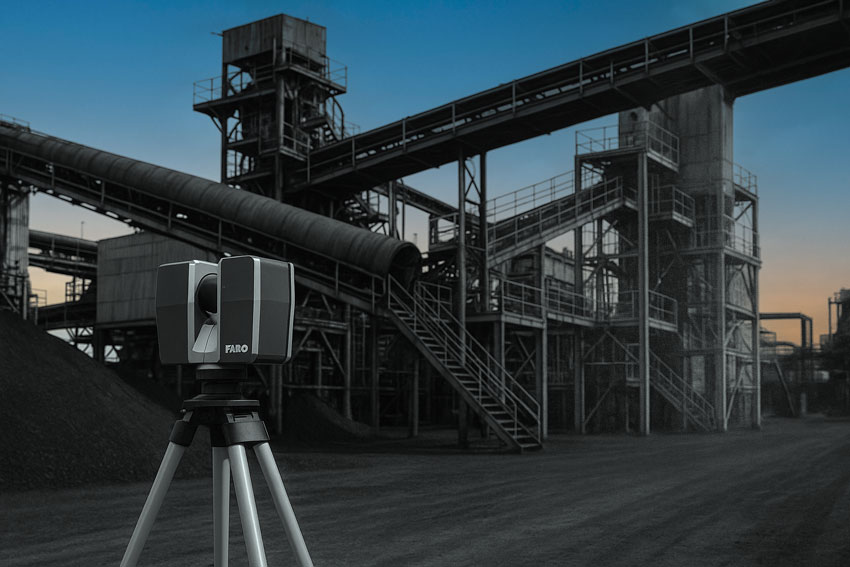

Accuracy of 3D LiDAR Scanning With FARO


When the Part Fits, Everything Runs Smooth

Here’s what actually happens when a chute or spool fits perfectly the first time:

  • The plant is back online faster
  • No rework
  • No reinstalling old worn-out parts
  • No arguing between fitters and supervisors
  • No unexpected surprises
  • No extra access equipment
  • No late-night stress
  • No grinding or “making it fit”
  • Other shutdown tasks stay on schedule
  • Everyone looks good
  • Production trusts the maintenance team again

Shutdowns become predictable.
Fitters become heroes, not last-minute problem-solvers.


Shutdown Example (Anonymous but Real)

A major processing plant needed a large chute replaced during a short shutdown window.
Access was limited.
The geometry was distorted.
Measurements were impossible to take safely.
The workshop needed exact dimensions, fast.

Hamilton By Design scanned the entire area from the ground — no EWP, no risk.

We produced:

  • Full 2 mm point cloud
  • As-built 3D model
  • New chute design
  • Digital fit-up validation
  • Workshop-ready drawings

The new chute arrived on site.
The old chute came out.
The new chute went straight in.
Zero rework.
Zero stress.
Plant online early.

The supervisor called it the smoothest shutdown they’d had in 10 years.


Why Fitters Should Reach Out Directly

Sometimes fitters know more about what’s really happening on-site than anyone in the office.

Fitters see the problems.
Fitters carry the blame.
Fitters deal with the rework.
Fitters just want parts that fit.

So we’re making this simple:

If you’re tired of fitting parts that don’t fit —
If you’re tired of fixing other people’s mistakes —
If you’re tired of shutdown stress —

Call Hamilton By Design.

We scan it.
We model it.
We get it right.
Every time.


Services Featured

Hamilton By Design offers:

  • 3D LiDAR laser scanning (2 mm precision)
  • 3D modelling by a fitter-engineer who understands real-world installation
  • Digital QA before fabrication
  • Reverse engineering of worn components
  • Shutdown planning support
  • Fabrication-ready drawings
  • Fit-up simulation
  • Clash detection between old and new parts

This is how shutdowns run smooth.
Hamilton By Design logo displayed on a blue tilted rectangle with a grey gradient background

Call to Action

Are you a Fitter: tired of parts that don’t fit?

Email or Call Hamilton By Design.

Email – info@hamiltonbydesign.com.au

Phone – 0477002249


Would you Like to Know more?
Name
Would you like us to arrange a phone consultation for you?

Accuracy of 3D LiDAR Scanning With FARO

Why Shutdown Parts Don’t Fit

Engineering Services

Coal Chute Design

Chute Design

3D CAD Modelling | 3D Scanning

Robotics and Human Relations: Balancing Innovation with Safety

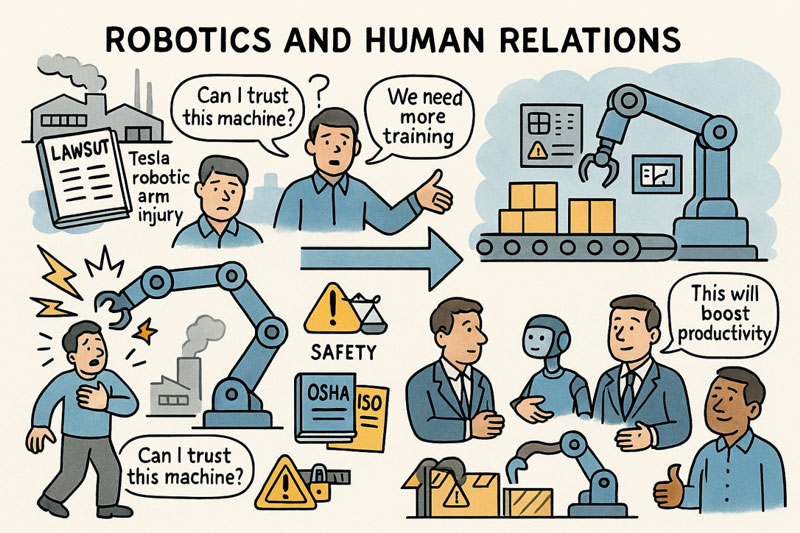
Robots are no longer the stuff of science fiction—they are embedded in our factories, warehouses, and even food-processing plants. They promise efficiency, speed, and the ability to take on dangerous jobs humans shouldn’t have to do. Yet, as recent headlines show, this promise comes with serious risks. From the lawsuit against Tesla over a robotic arm that allegedly injured a worker to the tragic death of a Wisconsin pizza factory employee crushed by a machine, the conversation about human–robot relations has never been more urgent.

This blog post explores the promise and peril of robotics in the workplace, drawing lessons from recent incidents and asking: how do we ensure humans and robots can coexist safely?

The Rise of Robotics in Everyday Work

Robotics is spreading quickly across industries. Automotive giants like Tesla rely on robotic arms for precision assembly, while food plants use automated systems to handle packaging and processing. According to the International Federation of Robotics, robot installations worldwide continue to grow year after year. For businesses, it’s a clear win: fewer errors, lower costs, and reduced human exposure to dangerous tasks.

But with robots entering smaller facilities—where safety infrastructure may be weaker—the risks grow. A mis calibrated robot, a missed safety step, or a poorly trained operator can turn a productivity tool into a deadly hazard.

When Robots Go Wrong: Lessons from Recent Cases

  • Tesla’s Robotic Arm Lawsuit
    A former technician at Tesla claims he was struck and knocked unconscious by a robotic arm while performing maintenance. The lawsuit highlights a crucial point: safety procedures like lockout/tagout aren’t optional—they are lifesaving. When machines are energized during servicing, even a momentary slip can have devastating consequences.
  • Wisconsin Pizza Factory Fatality
    In a smaller manufacturing plant, a worker lost his life after being crushed by a robotic machine. Unlike Tesla, this wasn’t a high-tech car factory but a food facility—showing that robotics risks extend far beyond Silicon Valley. Smaller plants may lack robust safety training, yet they are increasingly embracing automation.

Both cases are tragic reminders that technology alone can’t guarantee safety. Human oversight, training, and organizational commitment to safety matter just as much.

The Human Side of Robotics

When people think about robots at work, they often picture job displacement. But for many workers, the immediate concern is safety. Studies show that trust plays a huge role: workers who believe robots are reliable tend to perform better. However, misplaced trust—assuming a machine will always stop when needed—can be just as dangerous as fear or mistrust.

Beyond physical risks, robots can also affect morale and mental health. Workers may feel devalued or expendable when machines take over critical tasks. The challenge isn’t just engineering safer robots—it’s creating workplaces where humans feel respected and protected.

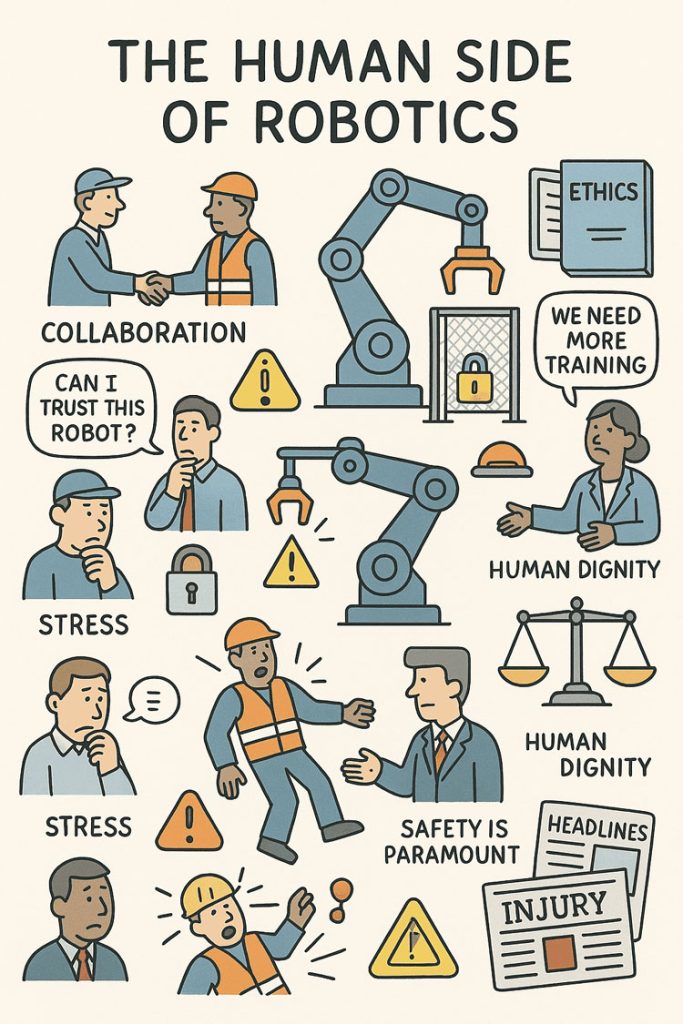
Illustrated infographic titled “The Human Side of Robotics,” showing workers interacting with industrial robots and highlighting concerns such as collaboration, trust, stress, training needs, ethics, safety, and human dignity. Several people appear worried or stressed, with speech bubbles saying “Can I trust this robot?” and “We need more training.” Warning symbols, safety locks, scales representing ethics, and a newspaper headline reading “Injury” emphasize workplace risks. A robotic arm works within a safety cage while workers discuss safety and ethical implications. The overall theme contrasts human concerns with the increasing use of robotics.

Building a Safer Future Together

So how do we strike the right balance between robotics innovation and human well-being? A few key steps stand out:

  1. Design Safety Into the Machine: Emergency stops, advanced sensors, and fail-safes should be standard features—not optional add-ons.
  2. Enforce Safety Protocols: OSHA’s lockout/tagout rules exist for a reason. Employers must ensure that servicing robots without proper shutdowns is never allowed.
  3. Invest in Training: Robots are only as safe as the people who interact with them. Ongoing, practical training helps prevent accidents.
  4. Foster a Safety Culture: Workers should feel empowered to report unsafe practices without fear of retaliation.
  5. Update Regulations: As robots spread into more industries, regulators must adapt. International safety standards like ISO 10218 need to be more widely enforced, especially in smaller facilities.

Conclusion

Robotics is here to stay. It has the potential to make our workplaces more efficient, less physically demanding, and even safer. But incidents like those at Tesla and the Wisconsin pizza plant remind us that without proper safeguards, the cost of automation can be measured in human lives.

The future of human–robot relations doesn’t have to be one of fear or tragedy. With the right mix of engineering, regulation, and workplace culture, robots and humans can work side by side—not as rivals, but as partners. The question isn’t whether we should embrace robotics, but whether we’ll do so responsibly, putting people’s safety and dignity first.


Mechanical Engineering | Structural Engineering

Mechanical Drafting | Structural Drafting

Hamilton By Design logo displayed on a blue tilted rectangle with a grey gradient background

3D CAD Modelling | 3D Scanning

Chute Design

SolidWorks Contractors in Australia

Hamilton By Design – Blog

Wisconsin pizza factory worker Robert Cherone crushed to death by robotic machine

Worker Sues Tesla After Alleged Robotic Arm Attack, Is Now Seeking Millions

Seeing the Unseen: How LiDAR Scanning is Transforming Mining Process Plants

In modern mining, where uptime is money and safety is non-negotiable, understanding the geometry of your process plant is critical. Every conveyor, chute, pipe rack, and piece of equipment must fit together seamlessly and operate reliably — but plants are messy, dusty, and constantly changing. Manual measurement with a tape or total station is slow, risky, and often incomplete.

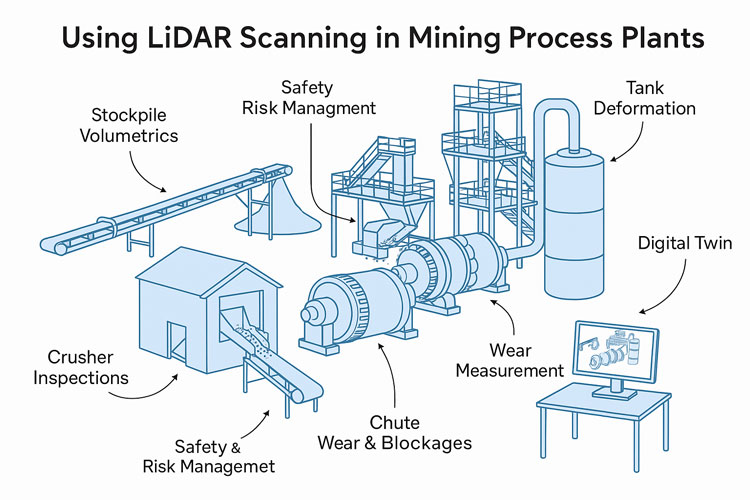
nfographic showing how LiDAR scanning is used in mining process plants, with illustrations of conveyors, crushers, tanks, mills and chutes. Labels highlight applications such as stockpile volumetrics, crusher inspections, safety and risk management, chute wear and blockages, mill wear measurement, tank deformation monitoring and creating digital twins.

This is where LiDAR scanning (Light Detection and Ranging) has become a game-changer. By capturing millions of precise 3D points per second, LiDAR gives engineers, maintenance planners, and operators an exact digital replica of the plant — without climbing scaffolds or shutting down equipment. In this post, we’ll explore how mining companies are using LiDAR scanning to solve real problems in processing plants, improve safety, and unlock operational efficiency.


What Is LiDAR Scanning?

LiDAR is a remote sensing technology that measures distance by firing pulses of laser light and recording the time it takes for them to return. Modern terrestrial and mobile LiDAR scanners can:

  • Capture hundreds of thousands to millions of points per second
  • Reach tens to hundreds of meters, depending on the instrument
  • Achieve millimeter-to-centimeter accuracy
  • Work in GPS-denied environments, such as inside mills, tunnels, or enclosed plants (using SLAM — Simultaneous Localization and Mapping)

The output is a point cloud — a dense 3D dataset representing surfaces, equipment, and structures with stunning accuracy. This point cloud can be used as-is for measurements or converted into CAD models and digital twins.


Why Process Plants Are Perfect for LiDAR

Unlike greenfield mine sites, processing plants are some of the most geometry-rich and access-constrained areas on site. They contain:

  • Complex networks of pipes, conveyors, tanks, and structural steel
  • Moving equipment such as crushers, mills, and feeders
  • Dusty, noisy, and hazardous environments with limited safe access

All these factors make traditional surveying difficult — and sometimes dangerous. LiDAR enables “no-touch” measurement from safe vantage points, even during operation. Multiple scans can be stitched together to create a complete model without shutting down the plant.


Applications of LiDAR in Process Plants

1. Wear Measurement and Maintenance Planning

LiDAR has revolutionized how mines measure and predict wear on critical process equipment:

  • SAG and Ball Mill Liners – Portable laser scanners can capture the exact wear profile of liners. Comparing scans over time reveals wear rates, helping maintenance teams schedule relines with confidence and avoid premature failures.
  • Crusher Chambers – Scanning inside primary and secondary crushers is now faster and safer than manual inspections. The resulting 3D model allows engineers to assess liner life and optimize chamber profiles.
  • Chutes and Hoppers – Internal scans show where material buildup occurs, enabling targeted cleaning and redesign to prevent blockages.

Result: Reduced downtime, safer inspections, and better forecasting of maintenance budgets.


2. Retrofit and Expansion Projects

When modifying a plant — installing a new pump, rerouting a pipe, or adding an entire circuit — having an accurate “as-built” model is crucial.

  • As-Built Capture – LiDAR provides an exact snapshot of the existing plant layout, eliminating guesswork.
  • Clash Detection – Designers can overlay new equipment models onto the point cloud to detect interferences before anything is fabricated.
  • Shutdown Optimization – With accurate geometry, crews know exactly what to cut, weld, and install — reducing surprise field modifications and shortening shutdown durations.

3. Inventory and Material Flow Monitoring

LiDAR is not just for geometry — it’s also a powerful tool for tracking material:

  • Stockpile Volumetrics – Mounted scanners on stackers or at fixed points can monitor ore, concentrate, and product stockpiles in real time.
  • Conveyor Load Measurement – Stationary LiDAR above belts calculates volumetric flow, giving a direct measure of throughput without contact.
  • Blending Control – Accurate inventory data improves blending plans, ensuring consistent plant feed quality.

4. Safety and Risk Management

Perhaps the most valuable application of LiDAR is keeping people out of harm’s way:

  • Hazardous Floor Areas – When flooring or gratings fail, robots or drones with LiDAR payloads can enter the area and collect data remotely.
  • Fall-of-Ground Risk – High walls, bin drawpoints, and ore passes can be scanned for unstable rock or buildup.
  • Escape Route Validation – Scans verify clearances for egress ladders, walkways, and platforms.

Every scan effectively becomes a permanent digital record — a baseline for monitoring ongoing structural integrity.


5. Digital Twins and Advanced Analytics

A plant-wide LiDAR scan is the foundation of a digital twin — a living, data-rich 3D model connected to operational data:

  • Combine scans with SCADA, IoT, and maintenance systems
  • Visualize live process variables in context (flow rates, temperatures, vibrations)
  • Run “what-if” simulations for debottlenecking or energy optimization

As AI and simulation tools mature, the combination of geometric fidelity and operational data opens new possibilities for predictive maintenance and autonomous plant operations.


Emerging Opportunities

Looking forward, there are several promising areas for LiDAR in mining process plants:

  • Autonomous Scan Missions – Using quadruped robots (like Spot) or SLAM-enabled drones to perform routine scanning in high-risk zones.
  • Real-Time Change Detection – Continuous scanning of critical assets with alerts when deformation exceeds thresholds.
  • AI-Driven Point Cloud Analysis – Automatic object recognition (valves, flanges, motors) to speed up model creation and condition reporting.
  • Integrated Planning Dashboards – Combining LiDAR scans, work orders, and shutdown schedules in a single interactive 3D environment.

Best Practices for Implementing LiDAR

To maximize the value of LiDAR scanning, consider:

  1. Define the Objective – Are you measuring wear, planning a retrofit, or building a digital twin? This affects scanner choice and resolution.
  2. Plan Scan Positions – Minimize occlusions and shadow zones by preplanning vantage points.
  3. Use Proper Registration – Tie scans to a control network for consistent alignment between surveys.
  4. Mind the Environment – Dust, fog, and vibration can degrade data; choose scanners with appropriate filters or protective housings.
  5. Invest in Processing Tools – The raw point cloud is only the start — software for meshing, modeling, and analysis is where value is extracted.
  6. Train Your Team – Build internal capability for scanning, processing, and interpreting the results to avoid vendor bottlenecks.

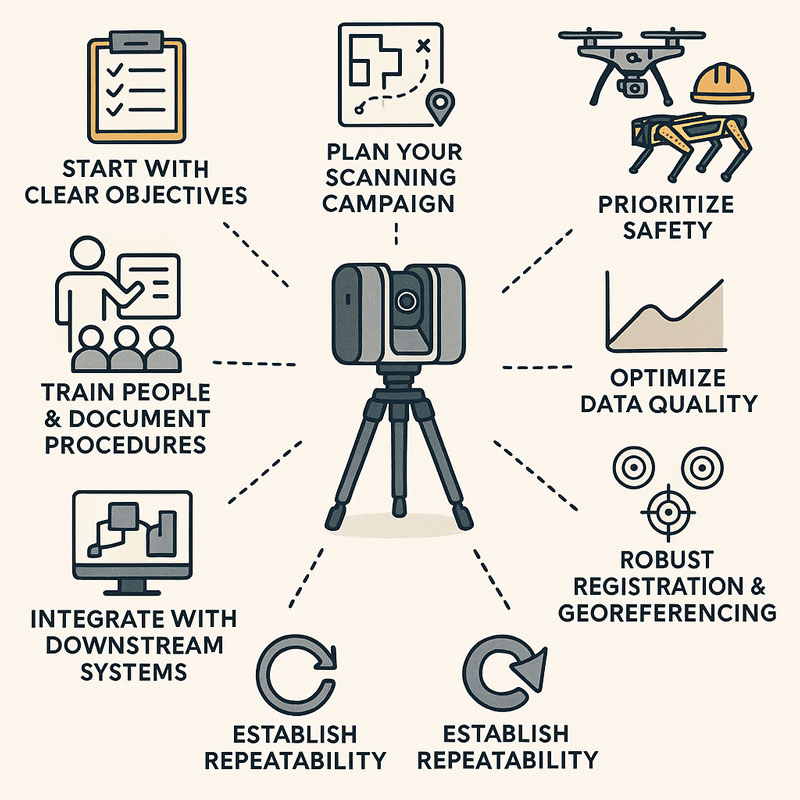
Infographic showing a 3D LiDAR scanner on a tripod surrounded by eight best-practice principles: start with clear objectives, plan your scanning campaign, prioritize safety, optimize data quality, ensure robust registration and georeferencing, establish repeatability, integrate with downstream systems, and train people with documented procedures

LiDAR scanning is no longer a niche technology — it is rapidly becoming a standard tool for mining process plants that want to operate safely, efficiently, and with fewer surprises. From mill liners to stockpiles, from shutdown planning to digital twins, LiDAR provides a clear, measurable view of assets that was impossible a decade ago.

For operations teams under pressure to deliver more with less, the case is compelling: better data leads to better decisions. And in a high-stakes environment like mineral processing, better decisions translate directly to improved uptime, reduced costs, and safer workplaces.

The next time you’re planning a shutdown, a retrofit, or even just trying to understand why a chute is plugging, consider pointing a LiDAR scanner at the problem. You may be surprised at how much more you can see — and how much time and money you can save.

3D Scanning | Mining Surface Ops | 3D Modelling

Mechanical Engineering | Structural Engineering

Mechanical Drafting | Structural Drafting

3D CAD Modelling | 3D Scanning

Chute Design

SolidWorks Contractors in Australia

Hamilton By Design – Blog

Why 3D Point Clouds + Expert Modelers Are a Game-Changer for Your Projects

Infographic illustrating the 3D project data workflow, showing LiDAR scanners and drones capturing millions of data points, a designer modelling on a computer, and project teams validating accurate 3D data, highlighting benefits such as speed, accuracy, cost savings and project success.

Level Up your 3D Scans

In today’s world, accuracy and efficiency can make or break a project. Whether you’re working in architecture, construction, engineering, or product design, you need reliable data — and you need it fast. That’s where 3D point clouds come in.

But there’s an important catch: not all scans are created equal. The difference between an average scan and a great one often comes down to the person behind the scanner. Having someone who understands 3D modeling take the scans can dramatically improve your project’s accuracy, reliability, and overall success.

Let’s break down why.


The Power of 3D Point Clouds

Point clouds are essentially millions of tiny data points that capture the shape of an object, room, or entire site. Together, they create a highly detailed digital snapshot of the real world.

Here’s why this matters:

  • Precision you can trust – Point clouds deliver incredibly detailed measurements, capturing even the smallest curves and angles.
  • Nothing gets missed – Multiple scan angles ensure a full, 360° view of your site or object.
  • Speed and efficiency – What used to take hours (or days) with manual measurements can be captured in minutes.
  • Built-in context – You’re not just getting numbers; you’re getting a complete digital environment to work inside.
  • Future-proof data – Once you have a scan, you have a permanent record of your space, ready to use months or years later.

From clash detection to as-built verification, point clouds save time, reduce errors, and make collaboration across teams smoother than ever.


Why the Person Taking the Scan Matters

While technology is powerful, experience is what makes the results reliable. Having a skilled 3D modeler operate the scanner can be the difference between a good project and a great one.

Here’s why an expert makes all the difference:

  • They know what matters – A modeler understands which details are critical for your project and ensures they’re captured.
  • Fewer gaps, fewer surprises – Experienced pros know how to plan scan positions to cover every angle and avoid blind spots.
  • Cleaner, more accurate data – They reduce common issues like noise, misalignment, or missing sections that can throw off your model.
  • Time saved, headaches avoided – No one wants to redo a scan halfway through a project. A professional ensures you get it right the first time.
  • Confidence from start to finish – When you know your model is accurate, you can move forward with design and construction decisions without second-guessing.

In short: a great scanner operator doesn’t just deliver data — they deliver peace of mind.


The Bottom Line

3D point clouds are already transforming how projects are planned and delivered. But pairing them with an experienced 3D modeler takes things to the next level.

You’ll get better data, faster turnarounds, and a far lower risk of costly mistakes. And when your goal is to deliver projects on time, on budget, and with zero surprises, that’s an edge you can’t afford to miss.

Hamilton By Design logo displayed on a blue tilted rectangle with a grey gradient background

3D Modelling | 3D Scanning | Point Cloud Scanning

Chute Design in the Mining Industry

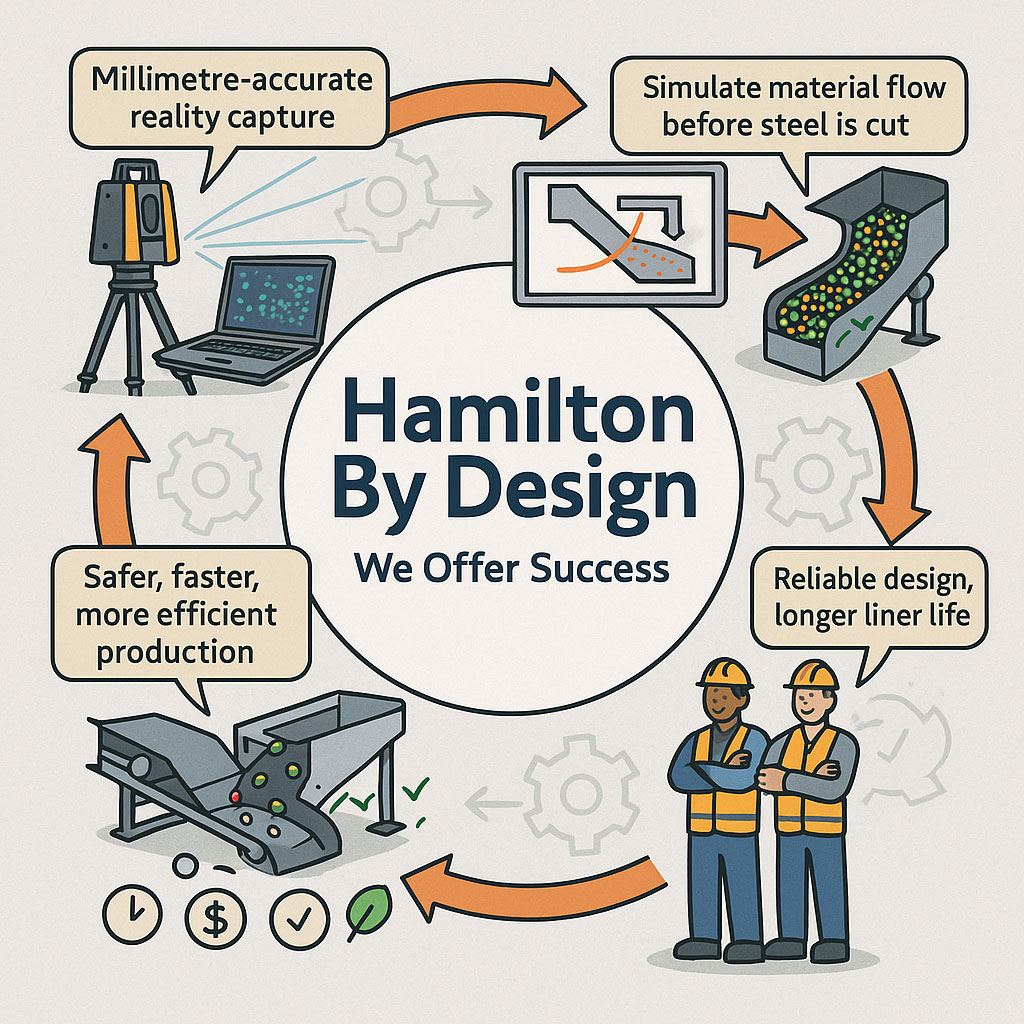
Infographic showing Hamilton By Design’s engineering workflow, including millimetre-accurate LiDAR reality capture, material-flow simulation, optimised chute designs, and safer, more efficient production outcomes. Two workers in PPE highlight reliable design and longer liner life, with icons representing time, cost and quality benefits.

Getting Coal, Hard Rock, and ROM Material Flow Right

Chute design is one of the most critical yet challenging aspects of mining and mineral processing. Whether you are handling coal, hard rock ore, or raw ROM material, chutes and transfer stations are the unsung workhorses of every operation. When designed well, they guide material smoothly, minimise wear, and keep conveyors running. When designed poorly, they cause blockages, spillage, excessive dust, and expensive downtime.

Modern chute design has moved far beyond rules of thumb and back-of-the-envelope sketches. Today, successful projects rely on accurate as-built data, particle trajectory analysis, and advanced Discrete Element Method (DEM) simulation to predict, visualise, and optimise material flow before steel is cut. In this article, we explore why these tools have become essential, how they work together, and where software can — and cannot — replace engineering judgement.


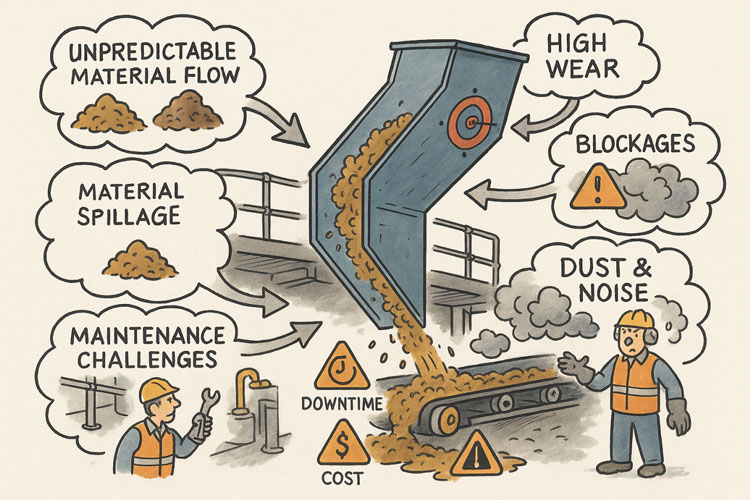
Illustration showing common problems with poorly designed material-handling chutes. A chute discharges material onto a conveyor while issues are highlighted around it: unpredictable material flow, material spillage, maintenance challenges, high wear, blockages, and dust and noise. Warning icons for downtime and cost appear on the conveyor, and workers are shown dealing with the resulting hazards and maintenance tasks.

The Challenge of Chute Design

Coal and hard rock have very different flow behaviours. Coal tends to be softer, generate more dust, and be prone to degradation, while hard rock is more abrasive and can damage chutes if impact angles are not controlled. ROM material adds another level of complexity — oversize lumps, fines, and moisture variation can cause hang-ups or uneven flow.

Chute design must balance several competing objectives:

  • Control the trajectory of incoming material to reduce impact and wear
  • Prevent blockages by maintaining flowability, even with wet or sticky ore
  • Manage dust and noise to meet environmental and workplace health requirements
  • Fit within existing plant space with minimal modification to conveyors and structures
  • Be maintainable — liners must be accessible and replaceable without excessive downtime

Meeting all these goals without accurate data and simulation is like trying to design in the dark.


Illustrated graphic showing a tripod-mounted 3D laser scanner capturing millimetre-accurate as-built data in an industrial plant with conveyors and walkways. Speech bubbles highlight issues such as “Outdated drawings don’t tell the full story” and “Modifications rarely get documented.” The scan data is shown being visualised on a laptop, with notes describing full coverage of conveyors, walkways, and services. Benefits listed along the bottom include faster data collection, fewer site revisits, safer shutdowns, accurate starting point for design simulation, and safer outcomes that ensure designs fit first time.

Capturing the Truth with 3D Scanning

The first step in any successful chute project is to understand the as-built environment. In many operations, drawings are outdated, modifications have been made over the years, and the real plant geometry may differ from what is on paper. Manual measurement is slow, risky, and often incomplete.

This is where 3D laser scanning changes the game. Using tripod-mounted or mobile LiDAR scanners, engineers can capture the entire transfer station, conveyors, surrounding steelwork, and services in a matter of hours. The result is a dense point cloud with millimetre accuracy that reflects the true state of the plant.

From here, the point cloud is cleaned and converted into a 3D model. This ensures the new chute design will not clash with existing structures, and that all clearances are known. It also allows maintenance teams to plan safe access for liner change-outs and other work, as the scanned model can be navigated virtually to check reach and access envelopes.


Understanding Particle Trajectory

Once the physical environment is known, the next challenge is to understand the particle trajectory — the path that material takes as it leaves the head pulley or previous transfer point.

Trajectory depends on belt speed, material characteristics, and discharge angle. For coal, fine particles may spread wider than the coarse fraction, while for ROM ore, large lumps may follow a ballistic path that needs to be controlled to prevent impact damage.

Accurately modelling trajectory ensures that the material enters the chute in the right location and direction. This minimises impact forces, reducing wear on liners and avoiding the “splash” that creates spillage and dust. It also prevents the material from hitting obstructions or dead zones that could lead to build-up and blockages.

Modern software can plot the trajectory curve for different loading conditions, providing a starting point for chute geometry. This is a critical step — if the trajectory is wrong, the chute design will be fighting against the natural path of the material.


The Power of DEM Simulation

While trajectory gives a first approximation, real-world flow is far more complex. This is where Discrete Element Method (DEM) simulation comes into play. DEM models represent bulk material as thousands (or millions) of individual particles, each following the laws of motion and interacting with one another.

When a DEM simulation is run on a chute design:

  • You can visualise material flow in 3D, watching how particles accelerate, collide, and settle
  • Impact zones become clear, showing where liners will wear fastest
  • Areas of turbulence, dust generation, or segregation are identified
  • Build-up points and potential blockages are predicted

This allows engineers to experiment with chute geometry before fabrication. Angles can be changed, ledges removed, and flow-aiding features like hood and spoon profiles or rock-boxes optimised to achieve smooth, controlled flow.

For coal, DEM can help ensure material lands gently on the receiving belt, reducing degradation and dust. For hard rock, it can ensure that the energy of impact is directed onto replaceable wear liners rather than structural plate. For ROM ore, it can help prevent oversize lumps from wedging in critical locations.


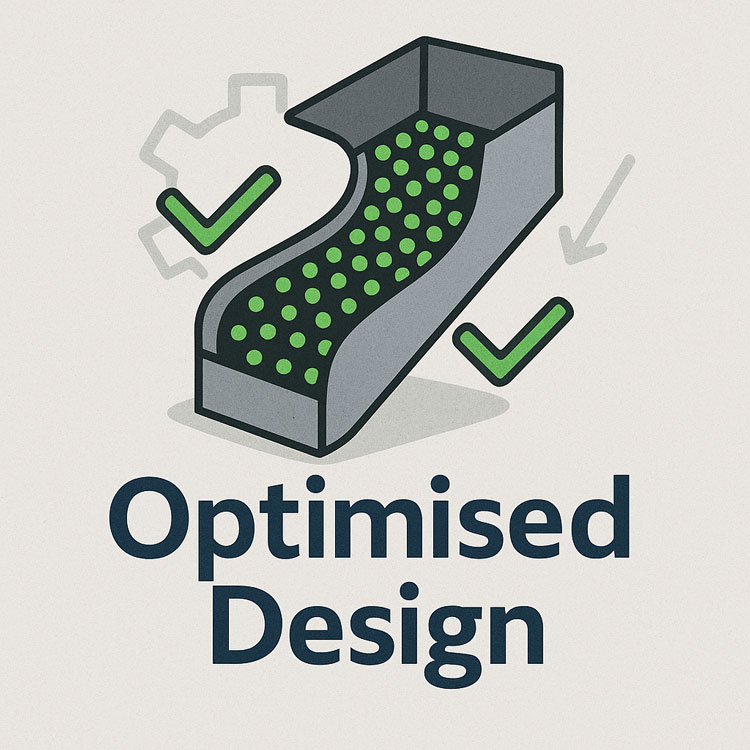
Illustration of an optimised chute design showing material flow represented by green particles, with check marks and gear icons indicating improved efficiency and engineered performance.

🖥 Strengths and Limitations of Software

Modern DEM packages are powerful, but they are not magic. Software such as EDEM, Rocky DEM, or Altair’s tools can simulate a wide range of materials and geometries, but they rely on good input data and skilled interpretation.

Key strengths include:

  • Ability to model complex, 3D geometries and particle interactions
  • High visualisation power for communicating designs to stakeholders
  • Capability to run multiple scenarios (different feed rates, moisture contents, ore types) quickly

However, there are limitations:

  • Material calibration is critical. If the particle shape, friction, and cohesion parameters are wrong, the results will not match reality.
  • Computational cost can be high — detailed simulations of large chutes with millions of particles may take hours or days to run.
  • Engineering judgement is still needed. Software will not tell you the “best” design — it will only show how a proposed design behaves under given conditions.

That’s why DEM is best used as part of a holistic workflow that includes field data, trajectory analysis, and experienced design review.


From Model to Real-World Results

When the simulation results are validated and optimised, the design can be finalised. The point cloud model ensures the chute will fit in the available space, and the DEM results give confidence that it will perform as intended.

This means fabrication can proceed with fewer changes and less risk. During shutdown, installation goes smoothly, because clashes have already been resolved in the digital model. Once commissioned, the chute delivers predictable flow, less spillage, and longer liner life.


Why It Matters More Than Ever

Today’s mining operations face tighter production schedules, stricter environmental compliance, and increasing cost pressures. Downtime is expensive, and the margin for error is shrinking.

By combining 3D scanning, trajectory modelling, and DEM simulation, operations can move from reactive problem-solving to proactive improvement. Instead of waiting for blockages or failures, they can design out the problems before they occur, saving both time and money.


Partnering for Success

At Hamilton by Design, we specialise in turning raw site data into actionable insights. Our team uses advanced 3D scanning to capture your transfer stations with precision, builds accurate point clouds and CAD models, and runs calibrated DEM simulations to ensure your new chute design performs from day one.

Whether you’re working with coal, hard rock, or ROM ore, we help you deliver designs that fit first time, reduce maintenance headaches, and keep production running.

Contact us today to see how our integrated scanning and simulation workflow can make your next chute project safer, faster, and more reliable.

Mechanical Engineering | Structural Engineering

Mechanical Drafting | Structural Drafting

3D Laser Scanning | 3D CAD Modelling | 3D Scanning

Chute Design

SolidWorks Contractors in Australia

Hamilton By Design – Blog

Consulting Engineers

About Us – Hamilton By Design

Hamilton By Design | 3D Scanning | Sydney | Perth | Brisbane | Mount Isa | Lidar Scanning

Contact us

3D Scanning

How 3D Laser Scanning is Redefining Reality for Design, Construction & Heritage

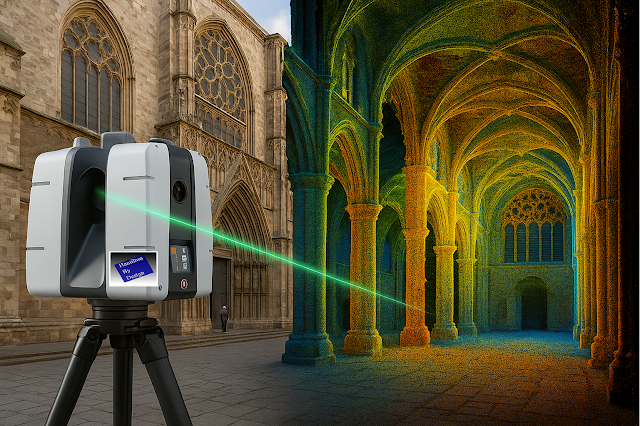
Imagine standing before a centuries-old cathedral, where every carved arch, every stained-glass pane, every weathered stone holds centuries of stories. Capturing its true form and condition with tape measure and camera? Tedious and prone to errors. But with 3D laser scanning, you can digitally freeze every detail—down to the imperfections—turning reality into an exact, manipulable model.

In an age where precision, speed, and data-driven decisions are non-negotiable, 3D laser scanning is no longer “nice to have”—it’s essential. Let’s explore what it is, why it’s transformative, where it’s being used most powerfully, and how you can harness its potential.

What Is 3D Laser Scanning?

At its core, 3D laser scanning sometimes called terrestrial laser scanning, (TLS) is the emission of laser pulses toward surfaces, recording the time it takes for those pulses to bounce back. From that comes a dense “point cloud” — billions of precise data points mapping shape, texture, orientation, and distance.

These point clouds become high-fidelity models, maps, meshes, or BIM ready files. Whether you’re scanning building exteriors, interiors, or industrial components, the result is more than just imagery—it’s measurable, analyzable geometry.

How It Works — The Process

  1. Preparation & Planning

    Define what you need: the level of detail (LOD), resolution, range, and whether external conditions (light, weather) will interfere.

  2. Data Capture

    Position the scanner at multiple stations to cover all surfaces. Use targets or reference markers for alignment and capture with overlapping scans.

  3. Processing & Registration

    Merge scans to align them properly, clean noise, filter out irrelevant data (like people, moving objects), calibrate.

  4. Post-processing & Deliverables

    Convert point clouds into usable outputs—floorplans, sections, elevations, 3D meshes, BIM models, virtual walkthroughs. Run analyses (clash detection, deformation etc.).

  5. Integration & Use

    Use the data in design, restoration, facility management, or documentation. The quality of integration (into BIM, GIS, CAD) is key to unlocking value.

Key Benefits

Benefit What It Means in Practice Real-World Impact
Extreme Precision Sub-millimetre to millimetre accuracy depending on the scanner and conditions. Less rework. Better fit for retrofit, renovation, or mechanical systems in tight tolerances.
Speed + Efficiency Collect large amounts of spatial data in far less time than traditional measurement. Faster project turnaround. Reduced site time costs.
Non-Contact / Low Disruption Good for fragile structures, hazardous or difficult-to-access places. Preserves integrity of heritage buildings; safer for workers.
Comprehensive Documentation Full visual & geometric context. Informs future maintenance. Acts as an archival record.
Better Decision Making & Conflict Detection Early clash detection; scenario simulation; what-if modelling. Avoids costly mistakes; helps build consensus among stakeholders.
Enhanced Visualisation & Communication Stakeholders can see exactly what exists vs. what’s being proposed. Improves client buy-in, regulatory approvals, fundraising.

Applications: Where It Shines

  • Architecture & Renovation: As-built models, restoration of heritage sites.

  • Infrastructure & Civil Engineering: Bridges, tunnels, rail track alignments.

  • Industrial & Manufacturing: Machine part audits, reverse-engineering, plant layout.

  • Heritage & Preservation: Documenting fragile monuments, archaeological sites.

  • Facility Management: Digital twins, maintenance, asset tracking.

  • Environment & Surveying: Terrain mapping, forestry, flood risk mapping (especially when combined with aerial systems or mobile scanning).

Challenges & Best Practices

Nothing is perfect. To get the most out of 3D laser scanning, anticipate and mitigate:

  • Environmental factors: Light, dust, rain, reflective surfaces can introduce noise.

  • Data overload: Massive point clouds are large; need strong hardware & efficient workflows.

  • Alignment & registration errors: Overlaps, control points, and calibration are vital.

  • Skill & Planning: Good operators + good planning = much better outcomes.

Key best practices:

  • Use reference targets for precise registration.

  • Capture overlap of 30-50% between scan positions.

  • Break project into manageable segments.

  • Clean noise early.

  • Think ahead about deliverables and how clients will use the data (design, BIM, VR etc.).

Case Studies & Stories

  • Heritage in Danger: A cathedral in Europe threatened by pollution and structural decay was laser scanned. The point cloud revealed minute deformations, enabling an accurate restoration plan—saving costs and preserving history.

  • Infrastructure Efficiency: A civil engineering firm reduced design clashes by 80% on a complex highway project by integrating scans with their BIM workflow.

  • Industrial Switch-Over: Manufacturing plant layout was reconfigured using scan data; downtime reduced because the virtual model matched reality better than the old blueprints.

Software, Tools & Ecosystem

While scanners are vital, the software ecosystem is what unlocks value. Tools that turn raw data into actionable insights include:

  • Reality capture tools (processing point clouds).

  • BIM / CAD integration (e.g. Revit, AutoCAD).

  • Visualization tools (VR, AR, walkthrough).

  • Data sharing & collaboration platforms.

  • Cloud storage / processing if large point clouds.

SaaS/cloud-based workflows are increasingly important to share among remote teams, facilitate stakeholder review, and ensure data is accessible beyond just technical users.

Why It Matters Now

  • Global pressures (heritage, sustainability, faster build cycles, remote work) are raising the bar.

  • Clients expect transparency, accuracy, minimized risk.

  • Regulatory compliance and “as-built” requirements are stricter.

  • Digital twins & smart infrastructure demand high fidelity data.

3D laser scanning acts as a bridge: between physical world and digital twin; between heritage past and future; between design promise and build reality.

If you have a survey scan and want to make sense of point cloud data, contact Hamilton By Design

#Scanning Sydney #3D Laser Scanning #3D Point Cloud Scanning #3D Laser Scanning Brisbane #3D Laser Scanning Mitcham London #3D Laser Scanning Perth #3D Laser Scanning Sydney #3D Mechanical Engineering